"AI plugin" means three different things in WordPress now, and most roundups I read mix them into one list. A plugin that writes your product descriptions and a plugin that lets Claude run PHP on your server share a category in every "best AI plugins" article I've read. They shouldn't. What follows is a map of WordPress MCP and AI-agent plugins, built from a survey of the field on 2026-09-02 and hands-on tests I ran on live local sites.
If you want the deep test of what an MCP client actually receives from the two hosts below, that is the companion piece: what an AI agent sees when it connects to WordPress. Short version: both Albert and Novamira expose exactly the same three gateway tools. The differences sit behind that door.
The three kinds
| Kind | What it does | Agent touches your site? | Examples from this survey |
|---|---|---|---|
| Text generators | Write copy, images, SEO meta | No - output goes to you, not to your database | Yoast/Rank Math AI, GetGenie, Divi AI, CodeWP |
| MCP content-admin servers | Let an external AI client (Claude, ChatGPT) read and edit content over MCP | Yes - curated, typed actions on posts, pages, users, media | Albert, Agent Abilities for MCP, Royal MCP, Easy MCP AI |
| PHP-execution hosts | Let the agent run code, WP-CLI, and file operations inside WordPress | Yes - effectively unrestricted admin-level code | Novamira, Cowboy MCP Power Mode, Angie Super Admin, AI Engine YOLO |
The border between the second and third kind is the whole security conversation. Both connect through the same door, and on both of the hosts I tested, that door is the official WordPress MCP Adapter exposing three meta-tools: discover abilities, get ability info, execute ability.
What the Abilities API actually is
WordPress 6.9 shipped the Abilities API: a standard way for a plugin to register a typed, permission-checked action, wp_register_ability. The official MCP Adapter turns registered abilities into an MCP server, so an external client like Claude Desktop can discover and execute them over OAuth. The introduction post on the developer blog is the canonical description.
The consequence for buyers: a host that speaks the Abilities API can surface abilities from any plugin that registers them, without integration work on either side. The consequence for plugin authors: register once, work everywhere.
On 2026-09-02 the WordPress.org plugin directory returned 384 plugins matching "mcp" and 1,513 matching "AI assistant". Many of those are noise for this map: SEO plugins that mention MCP in their copy, chat widgets, wrappers. The buckets below are the ones that actually operate a site or speak the standard.
The category map (2026-09-02)
I don't rank by WordPress.org active-install counts. That number is trivially spoofable, and ranking by it rewards a plugin for being popular rather than for being good. Everything here is ranked on what the agent is allowed to do, what is on by default, where credentials and site data end up, and whether actions are reversible.
Official building blocks
The canonical AI plugin (1.3.0) ships an Abilities Explorer and lists an MCP server as coming. The MCP Adapter itself is at 0.6.1. Automattic's earlier wordpress-mcp plugin was archived in January 2026 in its favor. WordPress.com runs a hosted MCP with write abilities on paid plans. If you are picking a self-hosted route today, the adapter plus a host plugin is the pattern both products I tested build on.
Curated MCP servers
| Plugin | The bet | What I verified or read |
|---|---|---|
| Albert | Curated CRUD, production-shaped defaults | Tested hands-on: writes off by default in code, privacy layer, per-block editing, no code execution |
| Agent Abilities for MCP | Governance first | 153 abilities, off by default, official adapter, audit log, least-privilege user. The governance benchmark in this category |
| Royal MCP | Undo as a feature | 200+ tools, OAuth, 72-hour undo window |
| Easy MCP AI | Scale | 243 tools, acquired by Themeisle, auto-discovers abilities |
| miniOrange Secure MCP | Enterprise posture | OAuth 2.1, human-in-the-loop, DLP; optional vendor gateway |
| WPVibe | Convenience over custody | Relays through wpvibe.ai and stores application passwords, encrypted, off-site. The trust-model outlier |
| Enable Abilities for MCP | Adapter-native | Capable, but abilities default ON. Wrong default for this class |
PHP-execution hosts
| Plugin | The bet | What I verified or read |
|---|---|---|
| Novamira | The agent as site operator | Tested hands-on: 41 own abilities including PHP, filesystem, WP-CLI; all MCP-public behind the gateway with Hub toggles as the gate |
| Cowboy MCP | Typed tools plus safety nets on live sites | Undo and DB checkpoints, Power Mode for WP-CLI/files. Publishes its own comparison page against Novamira |
| Angie Super Admin Mode | Opt-in power inside a chat product | Filesystem/DB/PHP behind a toggle; MCP added in 1.1.14 |
| AI Engine YOLO | The escape hatch, honestly labeled | GitHub-only companion to AI Engine, explicitly not for production |
AI Engine deserves its own line here: the official plugin ships an MCP server and a workspace with approval steps, and explicitly refuses to include PHP execution. The YOLO companion exists for people who want that. That is the cleanest default posture I found in the chat products.
Chat agents and the rest
In-admin chat agents (AI Engine, Angie, Uncanny Automator, Hostinger, SiteGround) put the chat inside wp-admin instead of connecting an external client. SiteGround's is the cautionary tale in this bucket: a 1.6-star rating with 81 one-star reviews at survey time, mostly about being auto-installed without consent. Auto-installing a plugin without consent is worse than anything on its feature list. Text generators (CodeWP, GetGenie, the SEO suites' AI) are a different category entirely and I left them out of the comparison.
The head-to-head that matters: behind the same three tools
I tested Albert 1.3.1 and Novamira Free 1.12.2 on live local sites, connected an MCP client to both, and captured everything. The tool lists are identical: three adapter meta-tools each, no per-ability tools, no pagination. So comparing them on "MCP support" is comparing identical things. The differences:
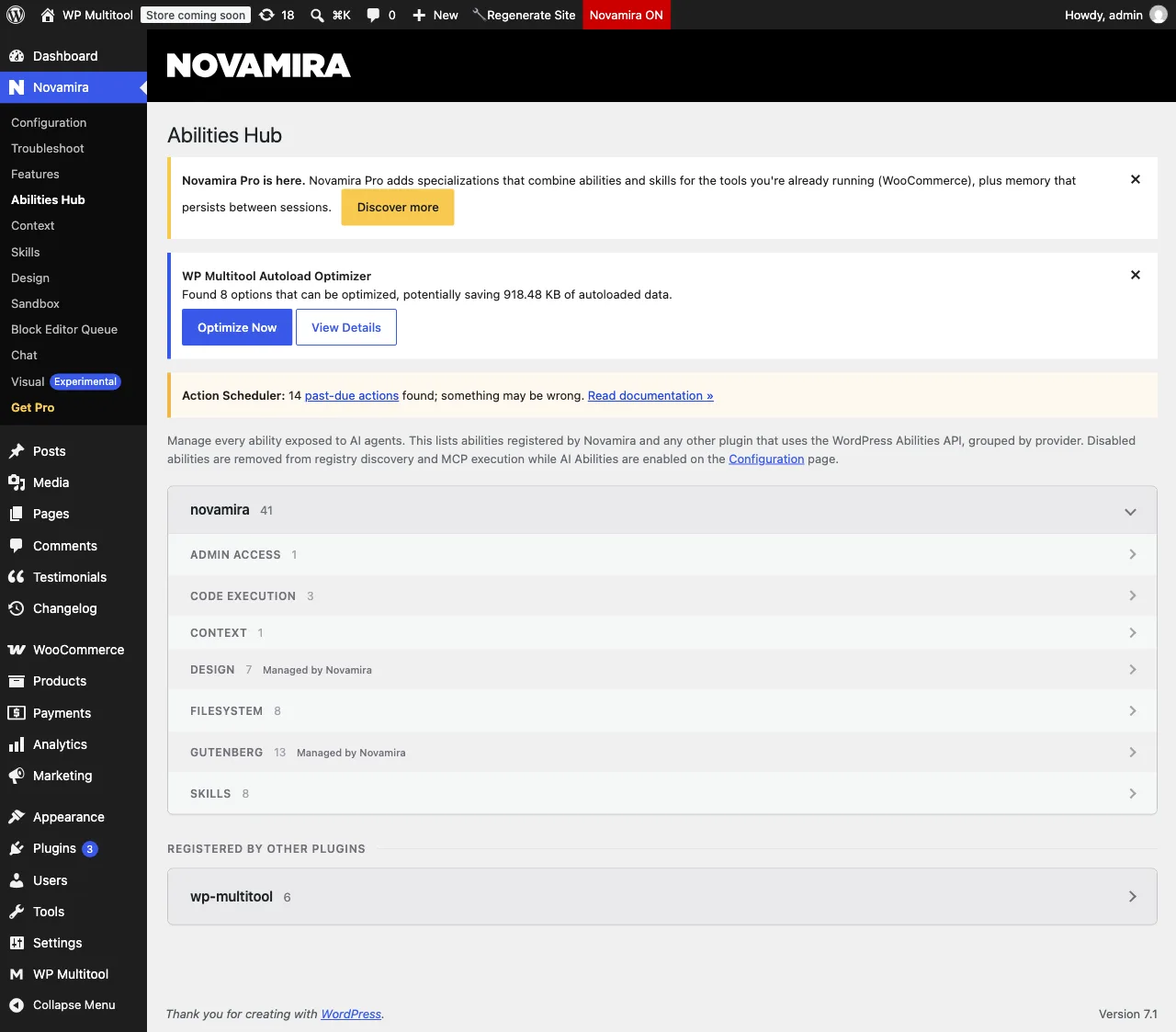
The catalog. Novamira registers 41 of its own abilities, including three code-execution abilities, eight filesystem abilities, a WP-CLI ability, and an admin-access ability. All of them were MCP-public on my test site, with the Hub's toggles as the gate. Albert ships 35 abilities of pure CRUD. No PHP, no filesystem, no WP-CLI anywhere in the plugin.
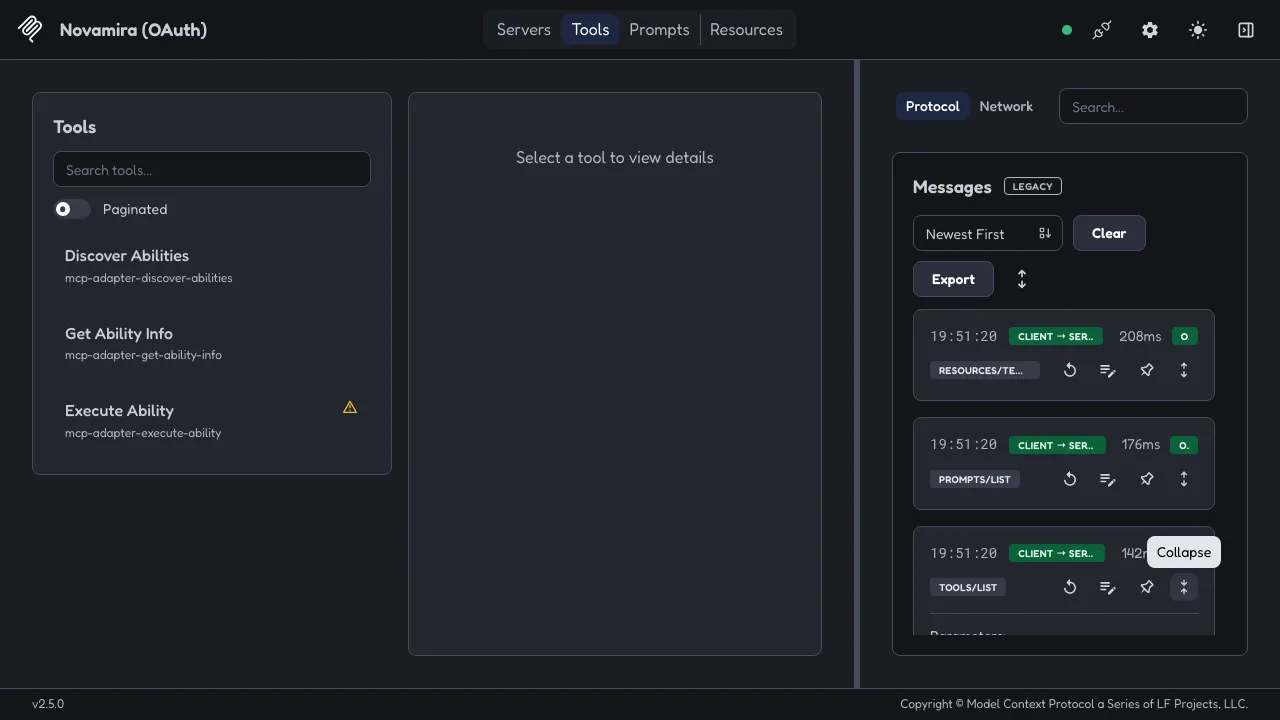
The consent screen. Novamira's OAuth consent lists the grant in plain words: execute PHP and WP-CLI, read/write/delete server files, create temporary administrator access. Albert's consent names the app and the code destination but doesn't enumerate the grant. Novamira's screen is the more honest of the two.
The domain lock. When I cloned the site to a new hostname, Novamira disabled its entire MCP surface until an admin re-enabled it. A stolen copy of the site won't serve MCP on the attacker's host. I found no equivalent in Albert and didn't test a configured Albert install on a moved hostname.
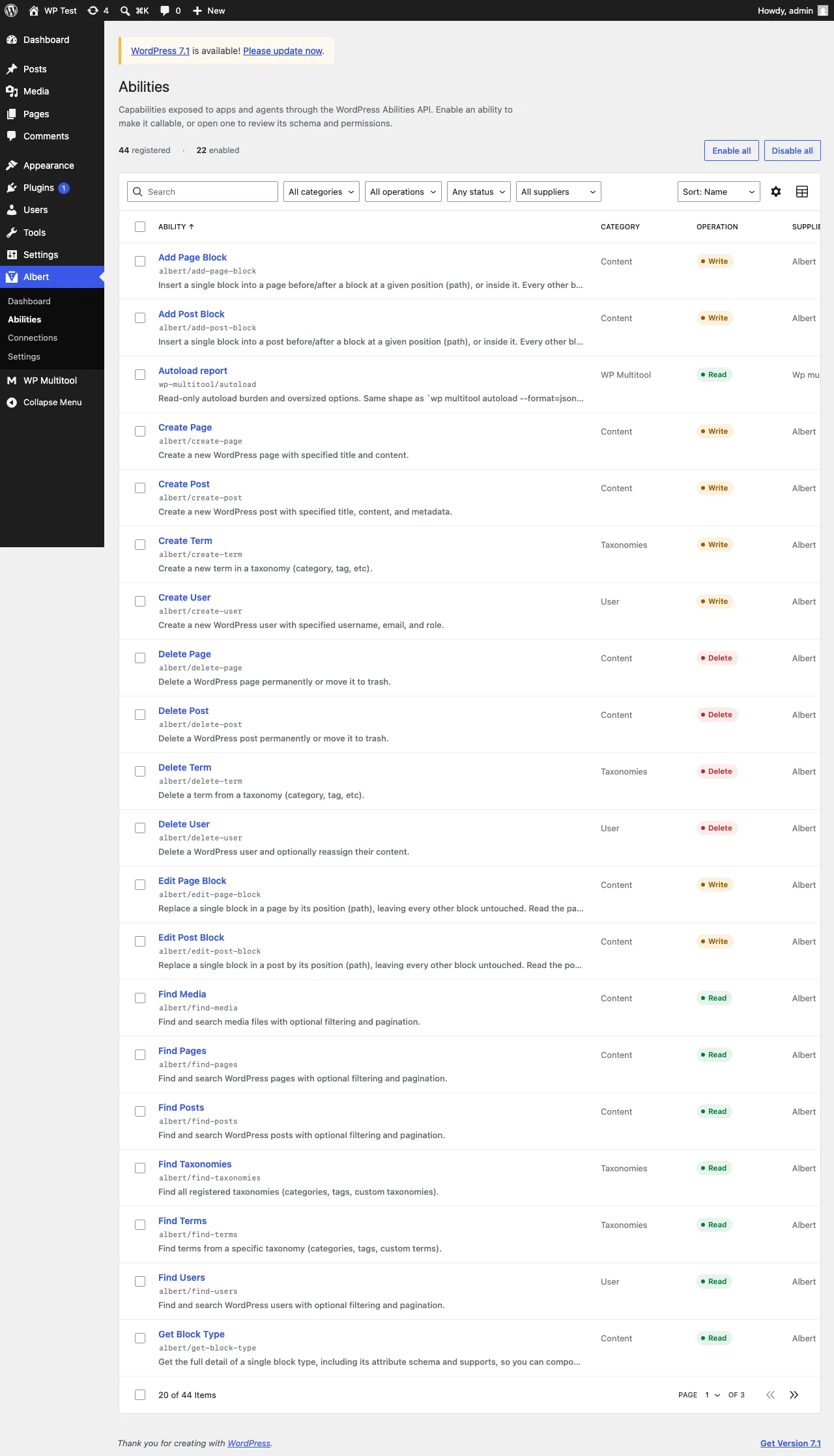
Albert shipped 1.4.0 the evening I finished testing, and it changes none of the above: a new Context screen that tells assistants what your site is, file sending from assistants, an admin redesign, WordPress 7.1 support. On a fresh 1.4.0 install the Abilities screen shows 46 rows with one contributing plugin, against 44 on the 1.3.1 I tested.
For a second opinion on the PHP-host model, Cowboy MCP publishes its own comparison page against Novamira, linked from its WordPress.org page. My survey read it as the typed-tools-with-undo-on-live-sites bet, positioned against Novamira's PHP-on-staging-with-backups model. A competitor publishing a comparison against the named category leader is worth your reading time, whatever you end up choosing, and it is why I cite it.
The one documentation failure I found
On 2026-09-02, Albert's own pages stated its ability count as 15, 35+, and 100+ in three different places, and none matched the 44 rows its admin screen showed on a fresh install. That was the only claim of Albert's that failed in my ten-claim test. Everything else I attacked, from write-defaults to privacy masking to the no-phone-home claim, held. Albert shipped 1.4.0 the evening I tested: the fresh-install screen now shows 46 rows, the wp.org page's 35+ claim is gone, and the homepage still says 15 and 100+. Checkable numbers, checked and dated.
That's the standard every table on this page should meet, including mine.
How I would choose
The survey behind this post ended with a recommendation I still stand behind after the hands-on tests: staging plus Novamira or Cowboy for agency work where the agent builds and fixes things; Albert or Enable Abilities for content CRUD only; and never PHP execution on production. The tests moved one word for me: Albert's write defaults and privacy layer held up under attack, so "Albert for content CRUD" is a stronger recommendation now than it was on paper.
Where a diagnostics plugin sits
I make WP Multitool. It registers six read-only abilities: a whole-site quickstart scan, a health snapshot, an autoload report, slow-query stats, Redis diagnostics, and a Site Doctor scan. The opt-in is off by default. The abilities are annotated read-only, which is what keeps them available under Albert's default policy of disabling everything non-read-only.
On Albert, all six appeared in its admin UI and in the agent's discovery list. On Novamira, all six appeared in the Hub and in the live registry, and the quickstart scan executed end-to-end through its gateway. Zero host-specific code on my side, either way. Hosts will come and go - the registration surface is the part that should outlast them, and it's the bet I've made with six read-only abilities.
If you run agents against WordPress sites, the practical writeup for pointing them at the CLI side is how to make your AI agent use WP Multitool, and the Novamira-specific pairing, including the skill file I ship inside the plugin, is in the combo post.
What I did not verify
- Search volume numbers. I found competing guides already ranking for "wordpress MCP" (smartwp.com, June 2026; nexterwp.com, July 2026), which is demand evidence, but I loaded no keyword tool.
- The current release state of every plugin in the map. The survey is dated 2026-09-02. Six of the listed plugins shipped a release that week. Re-check versions before you buy anything off this table; I re-checked the wp.org versions on 2026-09-04, before this published.
- Product pages I could not load: CodeWP pricing, WPTurbo, AutoWP, AI Mojo, WPBot, Divi AI. They stay out of the comparison tables.
- Whether Albert and Novamira coexist on one site.
- Novamira's own data handling and its Chat feature. I tested Albert's privacy layer; Novamira's stayed out of scope.
Disclosure
I make WP Multitool, a paid diagnostics plugin. As of 1.9.6 it can register six read-only Abilities and it ships a Novamira skill file. I'm not affiliated with Dynamic.ooo, with Albert, Cowboy, or with any other plugin here. I tested Albert and Novamira on local copies. WP Multitool is a data provider to these agents, not a competitor. I benefit if more sites adopt the Abilities API, whichever host they pick.
Category survey dated 2026-09-02; hands-on tests run 2026-09-03 against Albert 1.3.1 and Novamira Free 1.12.2. Install counts deliberately absent from every table. The companion post with the full test capture is what an AI agent sees when it connects to WordPress.