Two WordPress plugins promise to let an AI agent run your site over MCP: Albert, the AI Butler, and Novamira. I write a plugin that feeds data to agents like these, so I wanted to know what my plugin looks like from the agent's side of the connection. I set up two throwaway sites: a fresh one running Albert 1.3.1 from the plugin directory, and a clone of my own dev site running Novamira Free, updated to 1.12.2 from the GitHub release so it carried realistic data. Then I connected a real MCP client to each and counted the tools the agent gets.
Three tools. On both.
If you're evaluating WordPress MCP hosts, that number is the start of every comparison that matters.
How I tested
Albert ran on a fresh local install. Novamira ran on the clone, which is worth being precise about: the clone carried Novamira 1.11.6 from my dev site, and I updated it to 1.12.2 before testing, so what you read below went through the real version-change upgrade path. Albert came from the WordPress.org plugin directory; Novamira is distributed from its own site as a direct download. The client was the official MCP Inspector, connected over Streamable HTTP with OAuth 2.0 and PKCE. The category survey behind this post ran on 2026-09-02; every test below ran on 2026-09-03, against the versions current at that time.
I didn't use production sites. Nothing here touched a live store.
The same three tools, twice
Here is the complete tool list an authenticated MCP client receives from Novamira (names only; the raw capture carries title, description, and schemas):
{
  "tools": [
    { "name": "mcp-adapter-discover-abilities" },
    { "name": "mcp-adapter-get-ability-info" },
    { "name": "mcp-adapter-execute-ability" }
  ]
}
Albert returns the same three names. I checked both responses for a pagination cursor, because a truncated list would fake this result. Neither response has one. Three tools is the complete list on both hosts.
That surprises people who have seen either product's admin screen. Albert's Abilities page listed 44 rows on my fresh install, and six of those were my own plugin's. Without a contributing plugin it's 38. Novamira's Hub lists 41 of its own abilities plus everything other plugins register. Neither set becomes MCP tools. Both hosts bundle the official WordPress MCP Adapter, and both pass it only the adapter's three built-in meta-tools: discover abilities, get ability info, execute ability. An agent works by listing abilities, then executing one by ID through the gateway tool.
I verified this in Novamira's source as well, because a three-tool list is a big claim. DefaultServerFactory::create() hardwires the three adapter abilities as tools and auto-discovers only resources and prompts. The adapter does contain a mechanism for turning abilities into tools, and Novamira flags its abilities as MCP-public. Nothing surfaces as a fourth tool. The three routes Novamira serves, including the OAuth one, are mirrors of the same server.
So the tool surface, the part the agent sees first, is identical. What separates these products is everything behind the door.
How both hosts gate what the agent can do
Both hosts strip disabled abilities from the registry, so a disabled ability is invisible to discovery and to execution. Albert does this in code: on a fresh install it stores zero plugin options and disables every ability that is not marked read-only. I asked the gateway to run a disabled write ability, albert/create-post, and got back:
Ability 'albert/create-post' not found
The gateway does not say permission denied. From the agent's perspective the ability does not exist. After I toggled albert/edit-page-block on in Albert's admin, the same execution path ran it.
Novamira's Hub states the same model in its own words: "Disabled abilities are removed from registry discovery and MCP execution while AI Abilities are enabled on the Configuration page." Its dangerous abilities are off by default and need a confirmation dialog to enable.
Different catalogs behind the same door
Novamira ships 41 of its own abilities. The Hub's category rows include code execution (3 abilities), filesystem (8), Gutenberg (13), and admin access (1), plus a WP-CLI ability. On my clone, after enabling the surface, all 41 were registered and flagged MCP-public, with the Hub toggles as the gate. This matches what Novamira advertises itself as: the plugin whose product is running arbitrary PHP inside your WordPress, with a 30-second limit, through a sandbox at wp-content/novamira-sandbox/ that the vendor's own docs describe as not a security boundary.
Albert ships 35 built-in abilities. All of them are CRUD on content, users, and media. There's no PHP execution, no filesystem access, and no WP-CLI anywhere in the plugin. Writes and deletes are off by default through the code blocklist described above.
The consent screens, quoted
Both hosts use OAuth 2.0 with PKCE, and both walked my client through a consent screen before issuing tokens. The screens say different things.
Novamira's consent, verbatim:
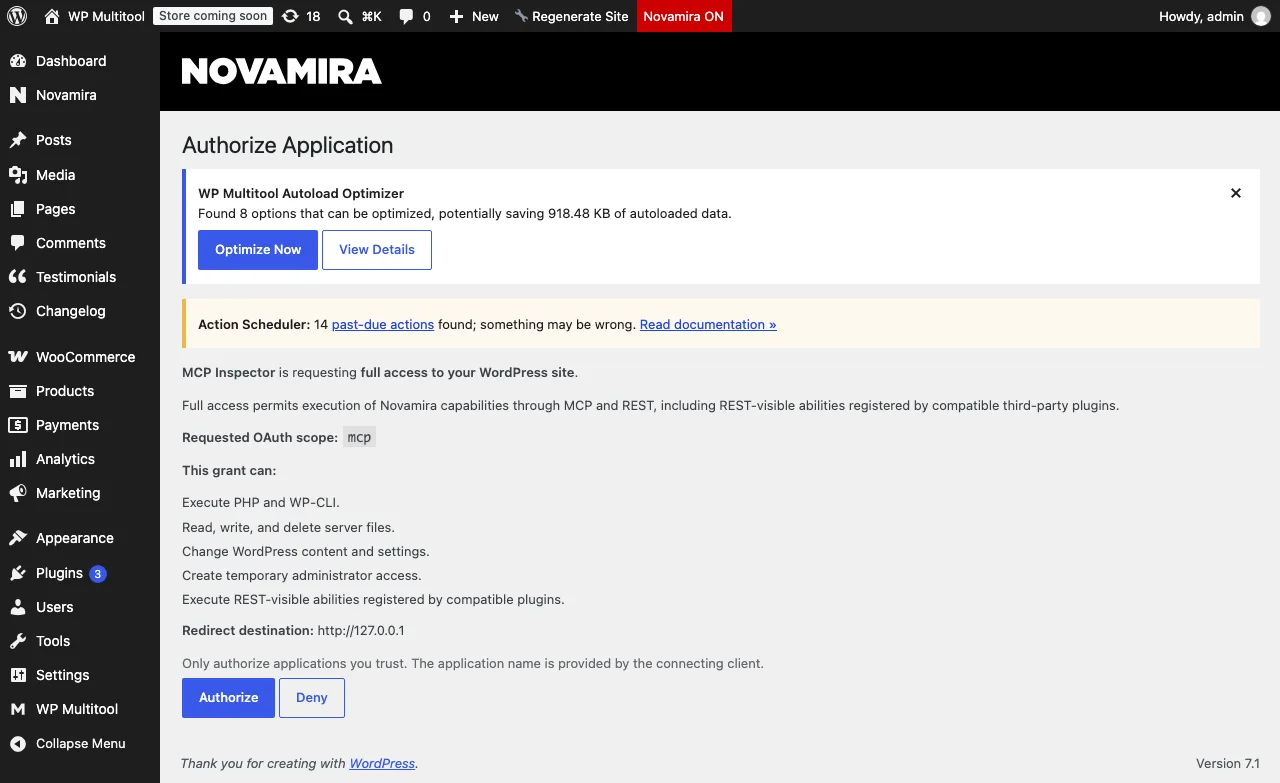
MCP Inspector is requesting full access to your WordPress site. [...] This grant can: Execute PHP and WP-CLI. Read, write, and delete server files. Change WordPress content and settings. Create temporary administrator access. Execute REST-visible abilities registered by compatible plugins.
I appreciate this screen. A non-technical site owner approving a connection sees, in plain words, that the application can run code and mint a temporary administrator. That is honest framing of a dangerous grant.
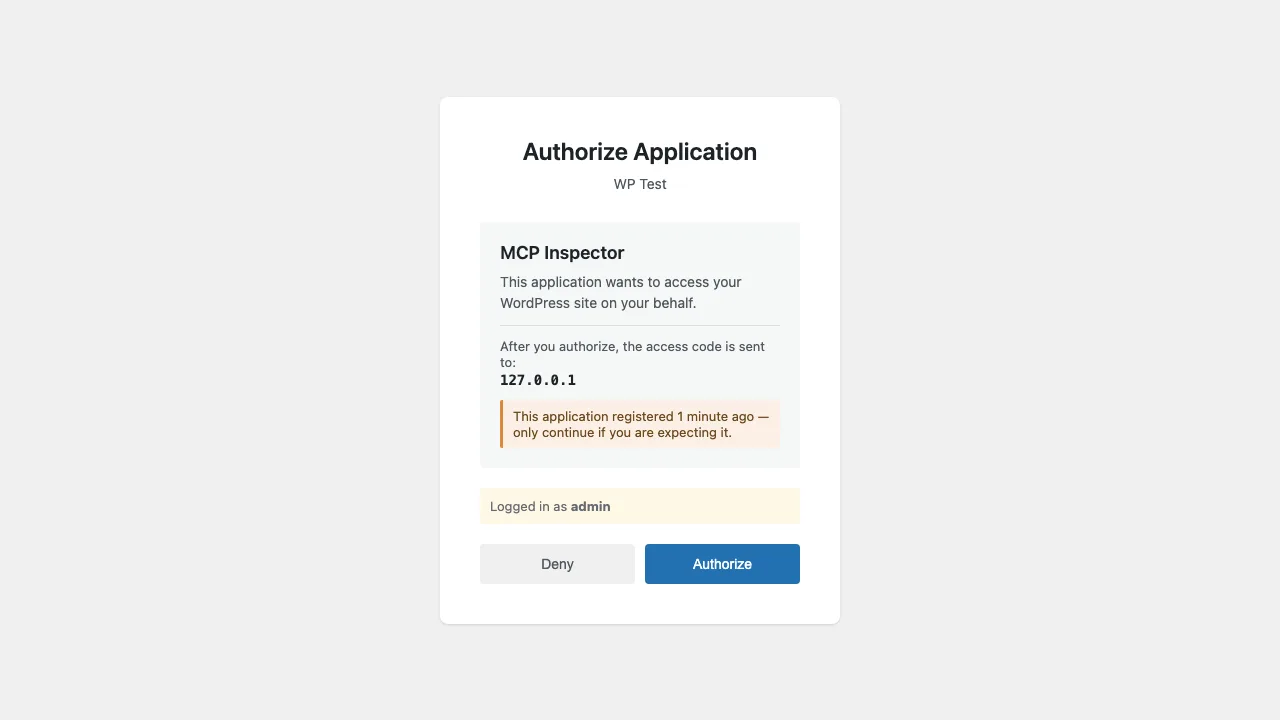
Albert's consent names the application, shows where the access code will be sent, warns when a client registered itself a minute ago, and shows which WordPress user is authorizing. It doesn't enumerate what the connection can do. Since Albert's catalog contains no code execution, the grant is smaller, but the screen does not say so. You have to know the product to know what you approved.
The security detail worth more attention: the domain lock
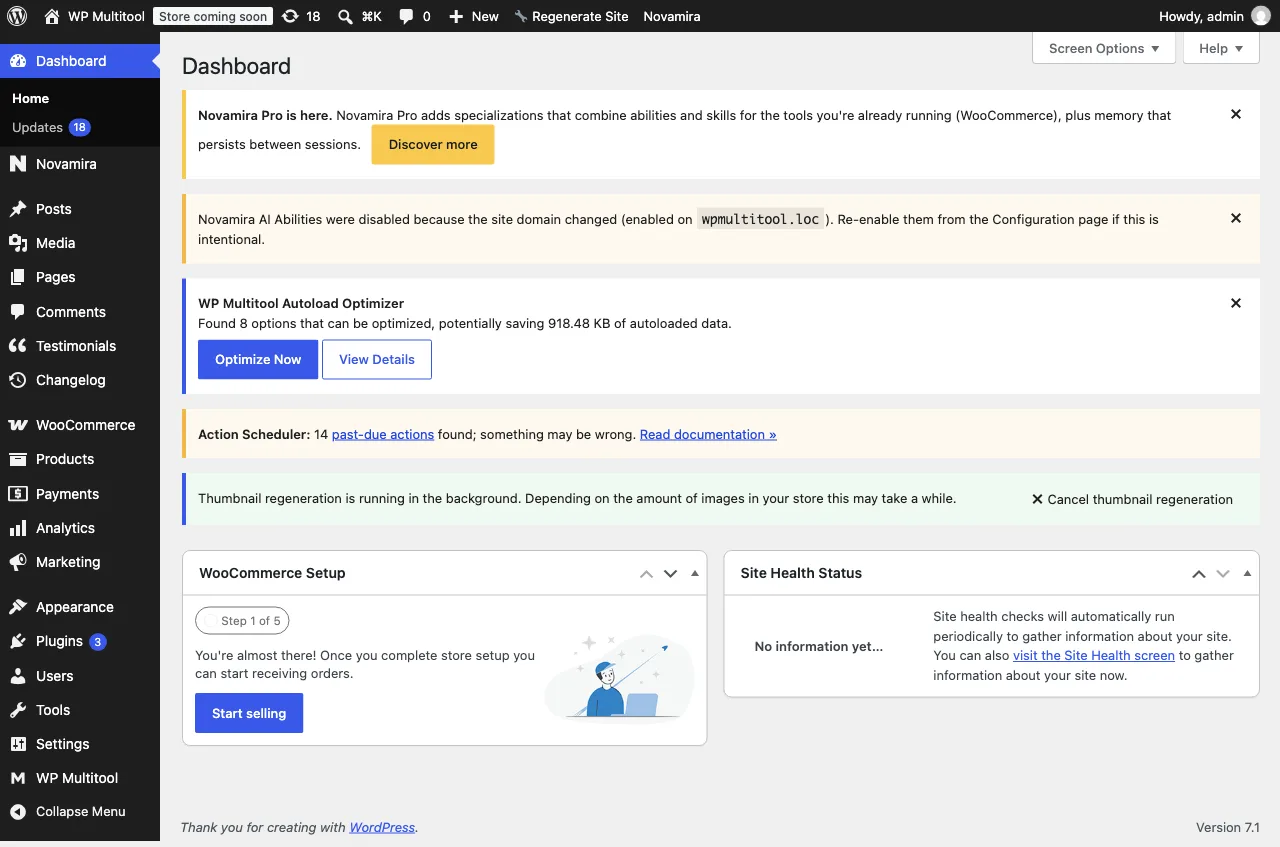
While setting up the Novamira test I cloned my dev site to a new hostname. Novamira noticed:
Novamira AI Abilities were disabled because the site domain changed (enabled on wpmultitool.loc). Re-enable them from the Configuration page if this is intentional.
The entire MCP surface, disabled, because the site moved. The lock lives in one option, novamira_ai_abilities_domain, and is enforced in code against the current hostname.
I checked the source before praising this, and it holds up. A stolen copy of a WordPress site, database and files and all, will not serve MCP on the attacker's hostname until an admin re-enables it. That is a real anti-exfiltration property. Novamira documents the lock in its own documentation, and in my read of both products it deserves far more prominence than Novamira gives it.
Albert has no equivalent state on a fresh install, and I didn't test a configured Albert install on a moved hostname. If someone wants to know, that's a separate test.
Small differences worth knowing
Endpoints split by auth mode. Novamira serves OAuth clients and application-password clients on different routes. /wp-json/mcp/novamira-oauth answers OAuth clients with a proper 401 challenge pointing at the OAuth metadata. /wp-json/mcp/novamira serves application-password clients with a bare REST 401. The server's own greeting states the split. Albert serves one route, /wp-json/albert/v1/mcp, with both discovery endpoints answering 200.
Skills surface as prompts. Novamira's four built-in skills appear in the MCP prompts list, and its discover-ability output carries an extra novamira_instructions field with agent guidance. The gateway itself instructs the agent. Albert's meta-tools are stock adapter tools.
Albert keeps an audit log. Every ability execution lands in a dedicated table with the ability name, user, status, and timestamp. Input, output, and client columns are empty in the free version, which matches the "full activity history" upsell on its dashboard.
Albert's privacy layer works. I tested it with a realistic user record. The default mode anonymizes. Strict mode masked the record even for my admin session: the email came back as p***@e***.com and the name as "Customer #2". Revealing real data requires an explicit per-call argument plus the gating capability. One nuance from my adversarial review pass: a bare top-level name field is only masked inside customer context, unless the ability opts in to name masking. The person-record abilities opt in. Email masking is unconditional.
Albert's per-block editing is surgical. I built a 42-block page, enabled exactly one write ability, and asked the gateway to replace the block at position 5, a single heading. One heading changed. The other nine headings, every paragraph, and the closing block stayed byte-identical, and the page grew by 60 bytes. The June support thread about truncated page output was a client-side limit, and the per-block design sidesteps it: an edit never round-trips the whole page. The input schema even accepts an expect argument so the edit refuses to apply if the target block changed underneath you.
The comparison in one table
Every row restates something tested or quoted above.
| Albert 1.3.1 | Novamira Free 1.12.2 | |
|---|---|---|
| MCP tools exposed | 3, the adapter's meta-tools | 3, the same names |
| Adapter | official WordPress MCP Adapter | official WordPress MCP Adapter, one server mirrored across three routes |
| Own abilities | 35, all CRUD on content, users, and media | 41, including code execution, filesystem, Gutenberg, admin access, WP-CLI |
| Writes by default | off; only abilities marked read-only start on | dangerous abilities off, confirmation dialog to enable |
| PHP execution | none anywhere in the plugin | yes, 30-second limit, through a sandbox the vendor's docs describe as not a security boundary |
| OAuth consent screen | names the app, shows the code destination, warns on fresh clients, shows the authorizing user; does not enumerate capabilities | enumerates the full grant in plain words |
| Domain lock | none on a fresh install; not tested on a moved site | yes; a hostname change disables the surface until an admin re-enables it |
| MCP route | one: /wp-json/albert/v1/mcp |
two, split by auth mode: /wp-json/mcp/novamira-oauth and /wp-json/mcp/novamira |
What this means for plugin developers
I write a plugin that feeds data to agents like these. This section is what my plugin looks like from the agent's side.
My plugin, WP Multitool, registers six read-only abilities: a whole-site quickstart scan, a health snapshot, an autoload report, slow-query stats, Redis diagnostics, and a Site Doctor scan. They sit behind an opt-in that is off by default. For these tests I turned it on. There's nothing in my code that knows about Albert or Novamira.
On Albert, all six appeared in its Abilities admin screen, grouped under a third-party supplier filter, and in the agent's discover-ability list. On Novamira, all six appeared in its Hub under "Registered by other plugins". Then I executed the quickstart ability through both gateways. Same request shape on both:
{
  "ability_name": "wp-multitool/quickstart",
  "parameters": {}
}
On the Novamira clone it returned seven findings, including the ones that matter on a real site: 974 KB of autoloaded options, 319,475 stored revisions, captured slow queries, and the Site Doctor checks. On the fresh Albert site it returned the Site Doctor findings for that install.
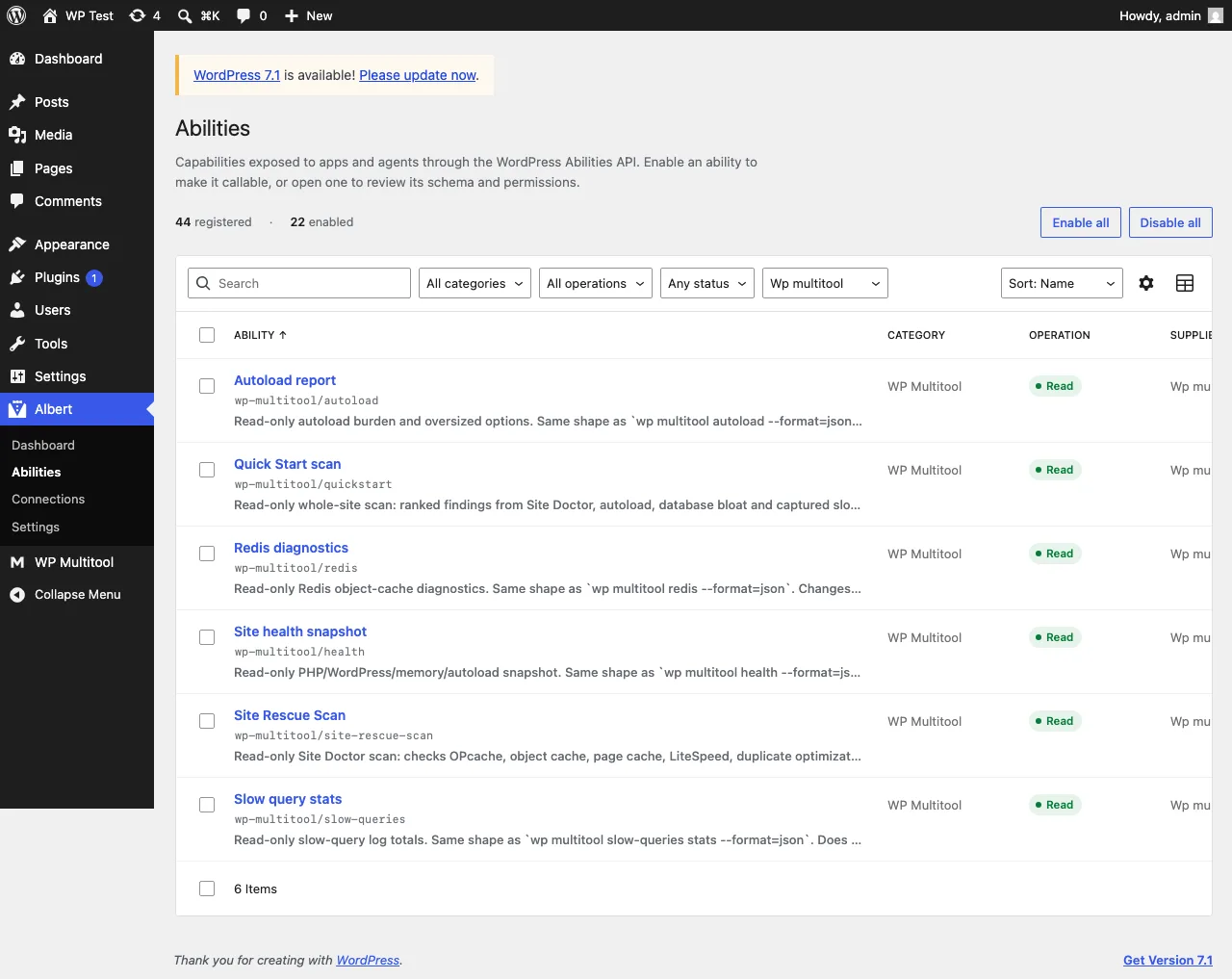
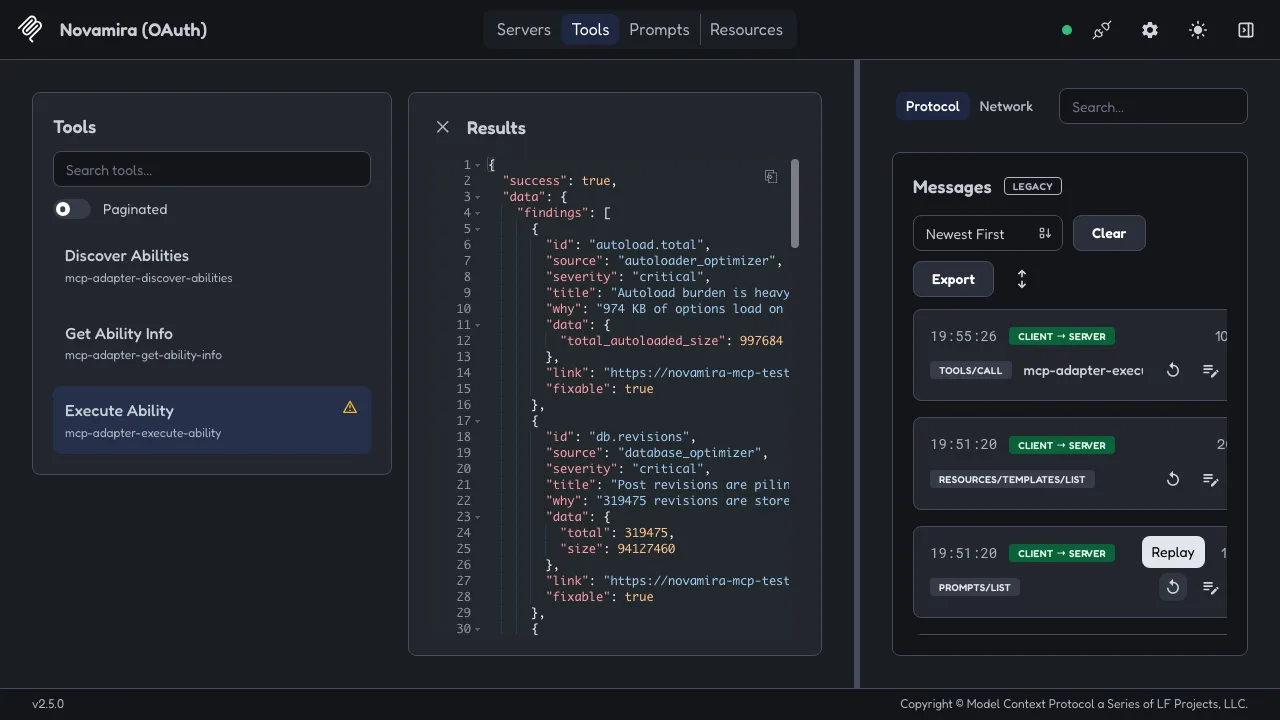
One detail mattered more than I expected. Albert disables every ability that is not annotated read-only. My abilities carry readonly: true in their registration, so they survive that policy and stay available. A plugin registering write abilities without annotations would arrive switched off.
That is the actual story of the Abilities API, and the official introduction from the WordPress team states it in its own words: "Once registered, that ability is discoverable and executable from PHP, JavaScript, and the REST API," and the adapter "lets AI tools (like Claude Desktop, Claude Code, Cursor, and VS Code) discover and call WordPress Abilities directly." My test is the smallest possible proof, and it ran on both hosts I could test hands-on.
If you want the reverse direction, pointing an agent at a WordPress site's CLI instead of its API, I wrote that up earlier: how to make your AI agent use WP Multitool. The Novamira-specific pairing, including the skill file I ship, is in the combo post.
What I did not check
- Data privacy on Novamira. I tested Albert's privacy layer. I didn't run anything similar on the Novamira side.
- Novamira Chat, the in-dashboard agent. It exists as a separate feature and stayed out of scope.
- Albert on a moved or cloned site, for the domain-lock comparison.
- A second OAuth session as a non-admin user. Albert's permission pipeline is verified in source. Novamira's docs say every ability requires
manage_options, and I didn't verify that in code. Both live connections ran as admin. - Whether Albert and Novamira coexist on one site. The research I did beforehand marked that unverified and I didn't verify it here.
- ChatGPT as the client. It connects from OpenAI's servers, so it cannot reach a local test site. The equivalent real-client test would be connecting Claude to WordPress with Claude Desktop or Claude Code.
Disclosure
I make WP Multitool, a paid diagnostics plugin. As of 1.9.6 it can register six read-only Abilities and it ships a Novamira skill file. I'm not affiliated with Dynamic.ooo, with Albert, or with any other host here. I tested both on local copies: Albert on a fresh site, Novamira on a clone of my own dev site. WP Multitool is a data provider to these agents, not a competitor. I benefit if more sites adopt the Abilities API, whichever host they pick.
Both hosts earned their facts here. In my read, Novamira's consent screen and domain lock are better than its marketing gives them credit for. Albert's defaults and privacy layer are better than its ability-count copy, which is the one thing its documentation gets wrong: the admin screen showed 44 abilities on a fresh 1.3.1 install with one contributing plugin, while three of its own pages said 15, 35+, and 100+. Albert shipped 1.4.0 the evening I tested: the fresh-install screen now shows 46 rows, the wp.org page's 35+ claim is gone, and the homepage still says 15 and 100+. I counted. So can you.
Survey 2026-09-02; tests 2026-09-03, against Albert 1.3.1 and Novamira Free 1.12.2. Raw tool lists and execution responses are archived; screenshots above are from the test sessions.