Four different jobs wearing one word
"WordPress optimization plugin" is close to meaningless. The phrase covers four jobs that share a marketing word but do unrelated work:
- Caching stores rendered HTML or query results so the server does less work per hit. WP Rocket, LiteSpeed Cache, Hummingbird.
- Asset optimization minifies, defers and lazyloads so the browser renders faster. Perfmatters, NitroPack.
- DB cleanup deletes revisions, transients and orphans. WP-Optimize, Advanced Database Cleaner, WP-Sweep.
- Diagnostics finds out WHY the site is slow: queries, plugins, hooks, config. Query Monitor, New Relic, Code Profiler.
The first two act on symptoms. They make delivery faster without ever asking why the server was slow. The third removes one specific root cause. Only the fourth diagnoses. WP Multitool lives in the fourth box and also carries the remediation of the third: it runs MySQL EXPLAIN on your slow queries and hands you index fixes, scores every plugin, classifies your autoload, then fixes what it finds. That combination is why it keeps getting compared against tools doing a completely different job, and why this page exists.
Here's the whole landscape on two axes: does the tool measure the cause, and does it act on it?
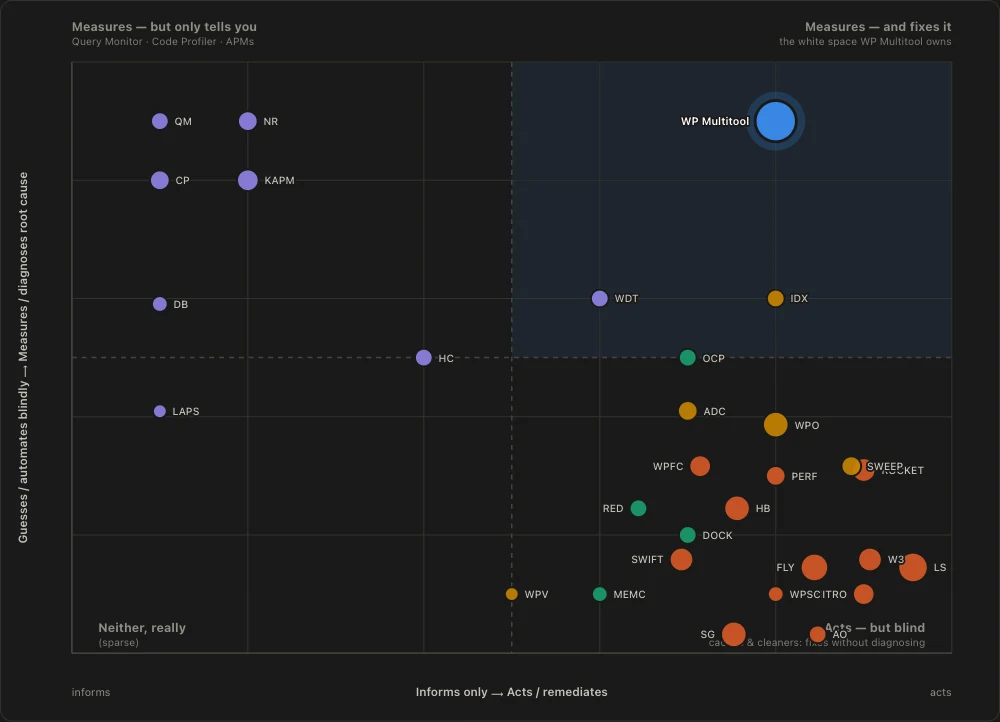
The rule of thumb that resolves 90% of the confusion: if a plugin's job is to make pages load faster, it's a cache or an asset optimizer, a different tool. WP Multitool's job is to tell you why the backend is slow and fix the cause. You run both.
Below, every comparison I've written, grouped by what the tool actually does. Each link goes to a full honest head-to-head, including where the other tool wins.
Group 1: Diagnostics and profiling (same job, different depths)
These are the true competitors. They diagnose the backend, which is WP Multitool's home turf. The differences are in what they measure, how accurately, and whether they fix anything afterwards.
Query Monitor is the free, canonical dev-time diagnostic. Request-scoped, informs only, and every WordPress developer should have it. WP Multitool adds persistent monitoring, EXPLAIN index advice and one-click fixes on top.
Code Profiler measures real per-plugin and per-function execution time on your actual site, which is more accurate than WP Multitool's static plugin score dataset. I concede that plainly. It stops at measurement though: no EXPLAIN, no autoload, no remediation.
New Relic is production-grade continuous APM, the most accurate profiling in this list, priced and shaped for enterprises rather than agency site fleets. It shows you the slow query and the stack trace; it never advises the index.
WP Debug Toolkit is the most direct commercial "toolkit" competitor by framing, with three tools (error log viewer, query viewer, site monitor) and a $199 lifetime price (as of July 2026) that undercuts ours. Its remediation is crash recovery (regain access after a fatal); it is thinner on query analysis and autoload and does not fix those root causes.
Group 2: Database cleanup (overlap on one module)
These overlap with exactly one of WP Multitool's modules, the Database Optimizer. They clean bloat; they don't profile, EXPLAIN or diagnose. And credit where due: the dedicated cleaners often go deeper on pure cleanup than we do.
WP-Optimize bundles cleanup with caching and image compression, a genuine all-in-one on the delivery side. Advanced Database Cleaner is the deepest pure cleaner I looked at, with orphaned-table detection and ownership attribution WP Multitool doesn't match. WP-Sweep is the simple free option using proper WordPress delete functions.
Index WP MySQL For Speed deserves its own line: it's the closest tool to us I found on the query axis specifically. It measures your real queries, then applies predefined better indexes to core tables. It has no EXPLAIN plans (per-query timing stats only), and nothing outside the query layer, but it measures real workloads and I respect the approach.
Group 3: Caching and asset suites (different job entirely)
The tools people most often compare us to, and the comparison is a category error. They speed up delivery. They cannot tell you which query or plugin makes your TTFB slow, and caching over a backend problem doesn't fix it. The honest verdict in every one of these posts is the same: run both.
WP Rocket is the premium caching standard, and WP Multitool is not an alternative to it. LiteSpeed Cache is the free powerhouse if your server runs LiteSpeed, and the only caching plugin I found that even displays autoload data (read-only, top 20, no fix). Perfmatters is the asset-optimization scalpel whose script manager partly mirrors our light Frontend Optimizer. NitroPack is the automated delivery SaaS. Hummingbird is WPMU DEV's polished freemium suite with a Lighthouse-style score audit, the closest of this cohort to a diagnostics story, though its diagnostics stop at the page level. Easy Optimizer is the newest of these and the one that gets furthest into our territory: a free all-in-one that does the whole delivery side and then adds a callback profiler, a query log and an autoload viewer on top. Worth reading if you want to know exactly where that backend half stops - it never runs EXPLAIN, and it only measures requests you trigger by hand.
Group 4: Object-cache backends (complementary, full stop)
These provide an object-cache backend. WP Multitool provides none; it monitors object-cache health (Site Doctor flags a dead drop-in, System Info shows Redis status). Not competitors in any sense.
Redis Object Cache is the free ecosystem default; if your host has Redis, install it today. Object Cache Pro is the same vendor's business-class version at $95/month (as of July 2026), with the strongest cache observability I've seen in this space, priced for hosts and high-traffic sites.
The master table
Compact version of the full capability grid. ✓ full, ◐ partial, ✗ none. All prices are as of July 2026.
| Tool | Category | Per-plugin profile | Query EXPLAIN + index advice | Hook profiling | Autoload analysis | DB cleanup | Page cache / assets | Fixes what it finds | Free tier |
|---|---|---|---|---|---|---|---|---|---|
| WP Multitool | diagnostics + backend fix | ◐ (static dataset) | ✓ | ✓ | ✓ | ✓ | ◐ (light script cleanup) | ✓ | ✗ (Lite $9 one-time) |
| Query Monitor | diagnostics | ◐ | ◐ (raw EXPLAIN, no index advice) | ◐ | ✗ | ✗ | ✗ | ✗ | ✓ |
| Code Profiler | diagnostics | ✓ (measured) | ✗ | ✓ | ✗ | ✗ | ✗ | ✗ | ✓ |
| New Relic | APM | ✓ (measured) | ✗ | ✓ | ✗ | ✗ | ✗ | ✗ | ✓ |
| WP Debug Toolkit | diagnostics | ◐ | ✗ | ✗ | ✗ | ✗ | ✗ | ✗ | ✗ |
| WP-Optimize | DB + delivery | ✗ | ✗ | ✗ | ✗ | ✓ | ✓ | ◐ | ✓ |
| Advanced DB Cleaner | DB cleanup | ✗ | ✗ | ✗ | ◐ | ✓ (deepest) | ✗ | ◐ | ✓ |
| WP-Sweep | DB cleanup | ✗ | ✗ | ✗ | ✗ | ✓ | ✗ | ✓ | ✓ |
| Index WP MySQL For Speed | index optimization | ✗ | ◐ (timings, no EXPLAIN) | ✗ | ✗ | ✗ | ✗ | ✓ (adds keys) | ✓ |
| WP Rocket | caching | ✗ | ✗ | ✗ | ✗ | ◐ | ✓ | ✗ | ✗ |
| LiteSpeed Cache | caching + assets | ✗ | ✗ | ✗ | ◐ (read-only) | ✓ | ✓ | ✗ | ✓ |
| Perfmatters | asset optimization | ✗ | ✗ | ✗ | ✗ | ◐ | ✓ (assets only) | ◐ | ✗ |
| NitroPack | delivery SaaS | ✗ | ✗ | ✗ | ✗ | ✗ | ✓ | ◐ (auto-applies) | ✓ |
| Hummingbird | delivery suite | ✗ | ✗ | ✗ | ✗ | ✓ | ✓ | ✗ | ✓ |
| Easy Optimizer | delivery suite + backend analyzer | ◐ (triggered runs only) | ✗ (logs slow queries, no EXPLAIN) | ◐ (triggered runs only) | ◐ (read-only, top 20) | ✓ | ✓ | ✗ | ✓ |
| Redis Object Cache | object cache | ✗ | ✗ | ✗ | ✗ | ✗ | ✗ (object layer) | ✗ | ✓ |
| Object Cache Pro | object cache + observability | ✗ | ✗ | ✗ | ✗ | ✗ | ✗ (object layer) | ✗ | ✗ ($95/mo) |
Reading down the index-advice, hook-profiling and autoload columns tells the story: WP Multitool is the only tool in this table with all three, and the only one I found that pairs backend diagnosis with one-click fixes across queries, autoload, database, debug.log and config. It is not #1 in any single column. The APMs and Code Profiler beat it on profiling accuracy, the caching suites own delivery entirely, and the dedicated cleaners go deeper on cleanup. The claim is breadth of diagnose-and-fix in one dashboard, and that claim holds.
So which should you actually use?
- Your pages render slowly and you haven't set up caching? Start with a caching or asset plugin (WP Rocket, LiteSpeed, Hummingbird, Perfmatters). That's not us, and I won't pretend otherwise.
- Your TTFB is slow, or the cache helped less than expected? That's a backend cause: a query, a plugin, an autoload blob, a misconfig. That's WP Multitool's job, and no caching plugin does it.
- You're a developer debugging one request right now? Query Monitor, free, no contest. Add WP Multitool when you need persistence, EXPLAIN advice and fixes.
- You need continuous production monitoring with budget to match? An APM. WP Multitool complements it with index advice and remediation the APM won't give you.
- You just want the database cleaned? A free dedicated cleaner is fine. WP Multitool makes sense when you want cleanup plus the diagnostic layer around it.
- You have Redis available? Install Redis Object Cache regardless of anything else on this page.
Most real setups end up with a cache, an object cache, and a diagnostics layer. WP Multitool is the third one, and the only spot on this map I found where measuring the cause and fixing it live in the same tool.
If that's the gap in your stack: $9 Lite (one-time, unlimited sites, 11 modules) → $79/yr Pro (1 site) or $199/yr (unlimited sites) with every module → $499 lifetime (unlimited sites). Compare tiers on /pricing/.