Latest: v1.6.1 · 13 Jul → wp plugin install wp-multitool --scan

One plugin to find and fix
every slow query.

19 tools in one plugin. Enable only what you need.

Start Fixing Slow Queries - $199/year Not sure yet? Scan your site for free →
“From 442ms to 38ms — this has been a great great improvement.”
Gaurav Tiwari · Query time: 442ms → 38ms
“A flawless, stable, and secure plugin. Websites run incomparably faster, and page loading after optimization is instant.”
— MDN · 5★ on Trustpilot
Unlimited-Site Plans All 19 Modules 30-Day Money-Back (14 on Pro)

19 Powerful Modules

Enable only what you need. Each module works independently.

#optimization Module

Action Scheduler Optimizer

Tame WooCommerce's bloated job queue

#utilities Module

Auto Updater

Pulls plugin updates from wpmultitool.com using your Polar license key.

#optimization Module

Autoloader Optimizer

Cut page load time by 0.5-2 seconds

#development Module

Config Manager

Edit wp-config.php without the terror

#admin Module

Dashboard Widget Manager

Control and customize WordPress dashboard widgets.

#optimization Module

Database Optimizer

Reclaim 500MB+ of wasted database space

#utilities Module

Debug Log Guard

Stop debug.log eating your disk — stream, compact, and size-guard the log

#optimization Module

Frontend Optimizer

One-click speed optimizations

#media Module

Image Manager

Control and customize WordPress image sizes with ease.

#utilities Module

Package Downloader

Allows users to download plugins and themes as zip archives directly from the site.

#optimization Module

External Call Optimizer

Stops WordPress phoning home more often than it needs to — reliable update-check gate, trimmed license/telemetry pings, security updates untouched.

#optimization Module

Plugin Performance Score

See which plugins slow your site — powered by makewpfast.com benchmarks

#utilities Module

Quick Updater

Enables drag-and-drop plugin updates directly from ZIP files on the Plugins list.

#utilities Module

Plugin Reactivator

Adds a quick reactivation option to plugins list for easy troubleshooting.

#development Module

Shortcode Inspector

A quick way to find and test shortcodes.

#optimization Module

Site Doctor

On-demand production misconfiguration scanner

#optimization Module

Find Slow Callbacks

Discover the slowest callbacks in your WordPress site by testing any URL.

#optimization Module

Slow Query Analyzer

Find slow queries without learning SQL

#development Module

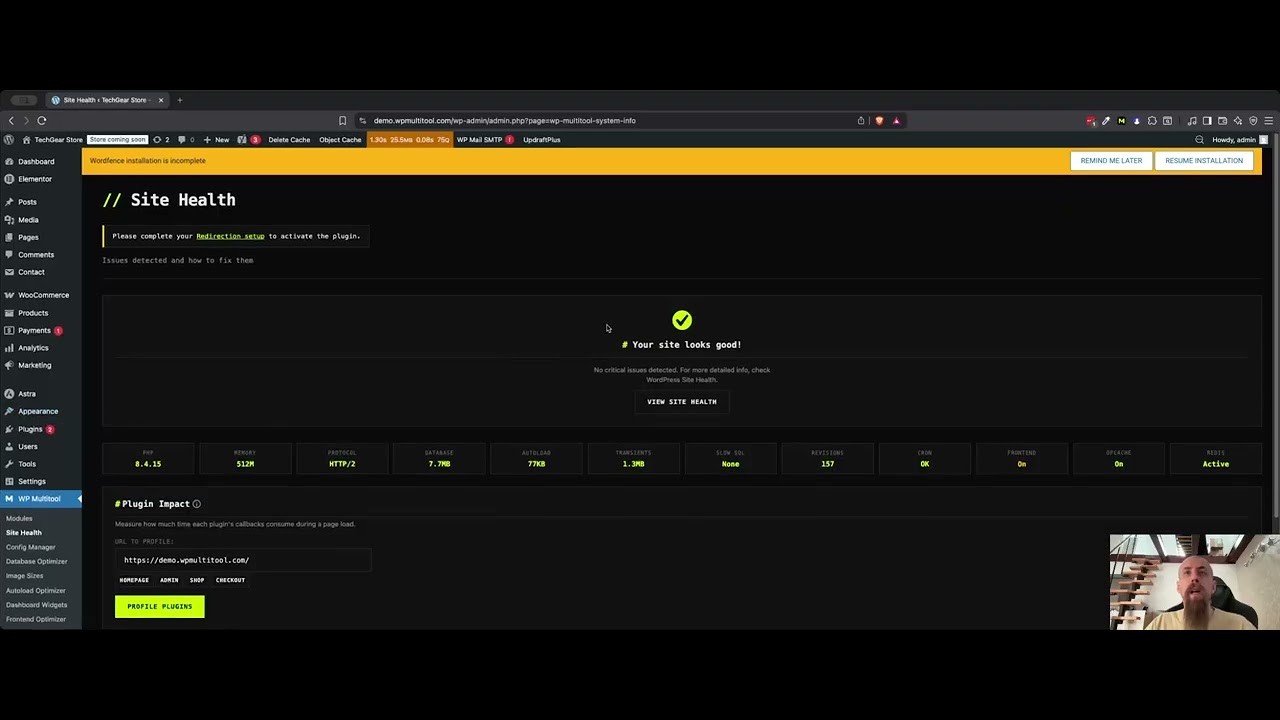
System Info

Check your server configuration and infrastructure

How It Compares

Different tools for different problems. Here's where WP Multitool fits.

Feature WP Multitool Query Monitor WP Rocket Perfmatters
Focus Backend/Server Dev debugging Frontend/Cache Frontend
Slow query detection + EXPLAIN analysis
Index suggestions Automated
Autoload optimizer remove bloat
Fatal error recovery auto-restore
wp-config editor safe GUI
Frontend optimization partial (bloat removal, defer scripts)
Best for Diagnosing & fixing server-side slowness Developers debugging Speed + caching Asset cleanup

Use WP Rocket for caching. Use Multitool to find why you need caching.

How It Works

Four steps. No complexity. Just results.

  1. Install

    Upload the zip. Activate. Takes 60 seconds.

  2. Scan

    19 modules analyze your queries, autoload, cron, and database.

  3. Fix

    Apply optimizations individually or batch. Auto-backup before every change.

  4. Fast Website

    Enjoy a super fast and optimized website.

See It In Action

Real demos. No fluff.

WP Multitool Demo — Install, Activate and Optimize (50% speedup)

Pick Your Plan

All 19 modules in one plugin. Own it for life at $499, or subscribe from $79/year.

Pro
$79
per year · 1 site
  • All 19 modules
  • Updates while subscribed
  • 1 site license
  • Email support
  • Cancel anytime
Get Pro - $79/yr

What Pro includes →

Yearly
$199
per year
  • All 19 modules
  • Updates while subscribed
  • Unlimited sites
  • Email support
  • Cancel anytime
Get Unlimited Sites - $199/yr
30-Day Money-Back Guarantee — 14 days on Pro (1 site)
Scan your site for free → Try Lite — $9 → Done-for-you setup — $679 → Compare all editions → View changelog →
WordPress
5.0 — 7.0+
PHP
7.4+
Database
MySQL 5.7+ / MariaDB 10.2+
Marcin Dudek - WordPress developer and creator of WP Multitool
Built by

I built WP Multitool because I got tired of installing 5-6 different plugins and spending hours on looking and configs just to optimize basic things. Now I just install WP Multitool and optimize the backend within minutes.

FAQ

Common questions, straight answers.

Will this break my site?

Auto-backup before any change. One-click restore if something goes wrong. Plus, the fatal error handler catches crashes and lets you recover instantly. You'd have to try pretty hard to break something permanently.

Do I need to disable my cache plugin?

No. Multitool complements cache plugins — it fixes root causes while they hide symptoms. Use both. WP Rocket handles the frontend, Multitool handles the backend.

What WP/PHP versions are supported?

WordPress 5.0 through 7.0+, PHP 7.4+, MySQL 5.7+ / MariaDB 10.2+. Fully tested on WordPress 7.0. But if you're not on PHP 8.2+ yet, the System Info module will roast you about it.

Is there support?

You email me directly and I read it - no ticketing system, just real answers from the person who built the plugin. Found a bug or have feedback? I actually want to hear it. Want hands-on setup? Performance Setup →

Can I use it on multiple sites?

Yes. The Lite ($9), Pro Annual ($199/yr) and Pro Lifetime ($499) editions all cover unlimited sites — one license for your whole portfolio. Running just one site? Pro is $79/yr for a single site — the cheapest way to get all 19 modules.

What if it doesn't help my site?

30-day money-back guarantee on most plans — the $79 Pro (single-site) plan is 14 days. If it doesn't solve your problem, you get your money back.

Why did the price change from $50 to $499?

The early access price of $50 was intentionally low to get real users and real feedback. After ~40 customers, a 97% keep rate, and consistent feedback that it was underpriced, the price now reflects the tool's actual value. A $199/year option is now available for those who prefer lower upfront cost.

Which LLM is the code sent to? Is there control over what data leaves my server?

No data leaves your server. The Slow Query Analyzer runs entirely locally — it uses MySQL EXPLAIN and rule-based pattern matching to analyze queries, not an external LLM. Your wp-config.php, credentials, and all other data stay on your server. Zero external API calls.