One button.
Checked afterwards.
Jumpstart runs every cleanup of the level you pick, fetches your homepage the way a visitor would, and puts the settings back if the page changed. You can undo its settings changes for 7 days, and anything it deletes is backed up first. There is no settings screen.
What happens when you press Run
I built WP Multitool for people who want to see the slow query. Jumpstart is for everyone else. Here is the whole flow, no steps hidden.
It measures first
Homepage request time as a visitor (median of three fetches) and the size of the settings WordPress loads on every page.
It cleans up
Every cleanup of the level you picked, in a fixed order. Settings changes go first, deletions wait.
It checks the homepage
Fetched logged-out, compared to a fingerprint taken before the run. If the page changed, the settings go back on their own and the deletions never start.
It measures again and tells you
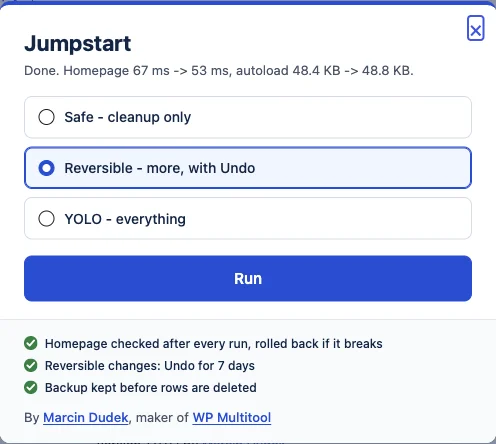
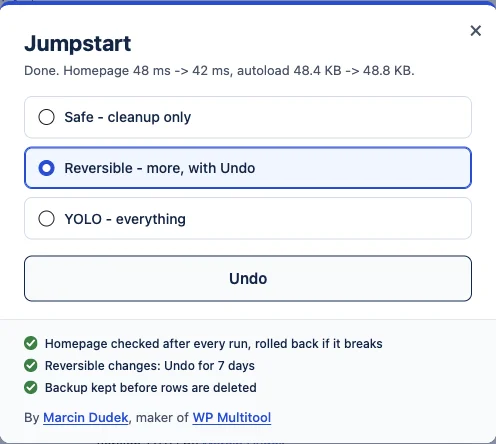
One line: the numbers before and after, from your site. If the run made little difference, the line says so. I would rather you knew.
Three levels, each includes the one before
| Cleanup | Safe | Reversible (default) | YOLO |
|---|---|---|---|
| Expired transients | yes | yes | yes |
| Finished background tasks older than a day | yes | yes | yes |
| Stop autoloading settings left by inactive plugins (undoable) | yes | yes | yes |
| Compact a debug.log over 1 MB (backup kept) | - | yes | yes |
| Standard head cleanup and security settings (undoable) | - | yes | yes |
| Old revisions pruned to the last 5, orphaned data removed (SQL backup first) | - | yes | yes |
| Stop autoloading oversized settings (undoable) | - | - | yes |
| Defer JavaScript (undoable) | - | - | yes |
| All transients, orphaned cron hooks, OPTIMIZE TABLE | - | - | yes |
"Standard head cleanup" means the 13 switches most optimizer plugins have: jQuery Migrate, Dashicons, emoji scripts, generator tag, RSD/WLW/shortlink/oEmbed links, XML-RPC, security headers, sensitive files, user enumeration, login attempts. If another optimizer on your site already handles one of them, Jumpstart leaves that one to it. It never writes another plugin's settings.
Lock it for a client: put define( 'JUMPSTART_MODE', 'safe' ); in wp-config.php and the dialog shows the level greyed out.
What it says afterwards
Four lines you can get. All of them are real strings from the plugin.
Your numbers will be your numbers. I am not going to put a percentage on this page that was not measured on your site.
Jumpstart or WP Multitool?
Jumpstart
- One Run link on the Plugins screen, one dialog
- Three levels, one Undo, one result line
- No dashboard, no reports, no options
wp jumpstart runfor scripts
WP Multitool
- 19 modules with their own screens
- Shows the slow queries, the slow plugin, the autoload rows, and lets you fix them one by one
- Site Doctor, profiler, slow query analyzer, image manager and the rest
wp multitoolwith a command per module
Both can be active on the same site. Jumpstart sees WP Multitool as another optimizer and leaves its settings alone.
Who it's for
One site, no time for a dashboard
You searched why your WordPress admin is slow, and you do not want to learn what a transient is. Press Run.
Freelancers handing over a site
A repeatable first pass with a backup, a homepage check and a 7-day Undo you can leave with the client.
Agencies on the CLI
wp jumpstart run --level=safe --format=json in a provisioning script, JUMPSTART_MODE to pin the level.
FAQ
Does Jumpstart need WP Multitool?
Can it break my site?
What does Undo cover?
Does it work with WP Rocket, Perfmatters, Autoptimize?
What does it not do?
Is $49 a one-time payment?
Can I run it on more than one site?
Where are the settings?
One button. Checked afterwards. Undo for 7 days.
$49/year, one site, 14-day money-back guarantee.