If you're planning a WordPress to Astro migration because the site is slow, check one number first: how long your server takes to answer. I went through about twenty "I moved from WordPress to Astro" write-ups and Astro vs WordPress comparisons for this post. None of the ones I found reported it.
That number matters because slow server response is the part of the "WordPress is slow" complaint you can fix without a rewrite, and usually for a lot less than a rebuild costs. I've spent years making WordPress sites fast, and I still think it's the best tool for most sites that have people editing them. Some of the reasons for leaving are real, though, and I'll say which ones.
The move itself is real. Cloudflare bought Astro in January 2026 and then shipped EmDash, an Astro-based CMS it calls a spiritual successor to WordPress. When I checked on 3 November 2026, Google's second autocomplete suggestion for "migrate wordpress to" was "astro".
What Astro is, and why not just plain HTML
Astro is a JavaScript framework that builds websites ahead of time. You write pages as components and content as Markdown files, run a build, and get plain HTML files you can put on any CDN. There's no database and no PHP, and by default no JavaScript ships to the visitor. When a page needs something interactive, like a search box, you mark that one component and only it gets JavaScript.
So why not write the HTML and CSS by hand? For a one-page site, you can, and some people do. The trouble starts at page two. Every page needs the same header, footer and menu, so you end up copying them into every file. Astro gives you layouts and components so you write the header once. It also turns a folder of Markdown posts into blog pages, and handles sitemaps, RSS feeds and image resizing at build time. Plain HTML gives you none of that.
A commenter on r/webdev put it this way: "Scale, the benefits of a static site generator like Hugo or Astro pay off as soon as you get more than ... 1 page, and they're about as close to zero overhead as you can get."
What Astro doesn't give you is an editor. The content lives in files, and changing it means editing Markdown and running a build. That's fine for developers. It's a problem for a marketing team, which is why so many migration threads end up asking which headless CMS to bolt on.
The number missing from Astro vs WordPress
Time to First Byte (TTFB) is how long the server takes to start sending the page. On WordPress that's PHP running, plugins loading and the database answering queries. On a static Astro site it's a CDN handing over a file that already exists.
WP Forged, a company that rebuilds sites in Astro, pulled the August 2026 HTTP Archive numbers for mobile. In their report, 64.2% of Astro sites had a good TTFB. For WordPress it was 23.5%. On all Core Web Vitals together, Astro passed 71.0% of the time and WordPress 48.7%.
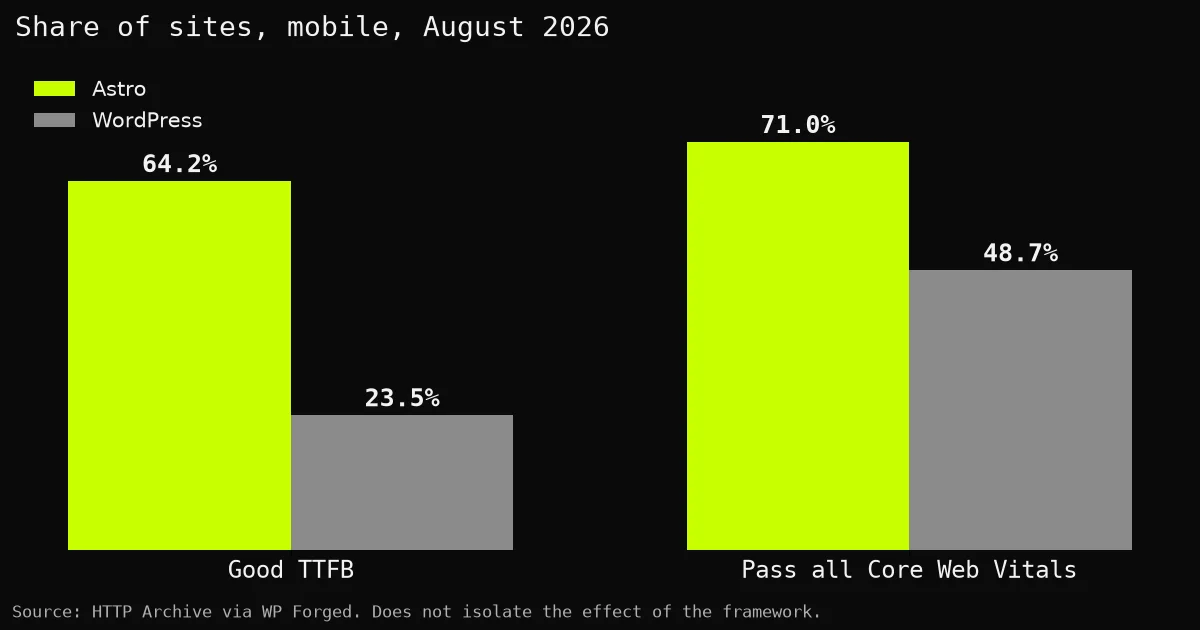
Read the caption before the bars. WordPress runs on everything from the cheapest shared hosting to enterprise clusters, and the average drags it down. My guess is that a good share of that 23.5% is cheap hosting with no page cache, and a good share of the Astro side is static files on a CDN. Put WordPress on decent hosting with a full-page cache and a CDN, and most visitors get a cached copy of the page without PHP or the database running at all. That's the same trick Astro uses.
Kashif Aziz's migration post is a good example of what gets missed. He went from a Lighthouse score of 72 to 100 and from 3.2 seconds to under 0.3. He already had a caching plugin, a CDN and optimized images. His gains are real, and I'm not saying he didn't need to move. What I can't tell from the write-up is how much of those 3.2 seconds was the server, because he didn't measure it.
Why people leave WordPress for Astro
These came up most often in the posts and threads I read, roughly in this order. It's about twenty sources, so it's a reading, not a survey.
- Plugin maintenance. "At some point, I was maintaining more than I was creating," wrote Pascal Cescato.
- Speed. Tony Perez, who co-founded Sucuri, reported "Page loads dropped from 2–4 seconds to under one."
- A blog that doesn't need a database. Kerem Erkan, after twenty years on WordPress: "why is my blog dynamic at all?"
- Hosting cost. Cescato went from a 4-core, 8 GB server to 1 core and 1 GB.
- Security and updates. Perez again: "With a static site, that entire supply chain collapses to almost nothing."
- Developer workflow. Git, Markdown and AI coding tools that work better on a plain code repo than on a database.
- Trust. The WP Engine vs Automattic fight comes up less in personal posts and more when agencies talk about enterprise clients.
Reddit reads the same. An agency owner on r/astrojs who moved 53 client sites off WordPress summed up the old setup as "Plugin updates, security patches, slow load times, all of it." A developer on r/webdev who moved one site to Astro and another to Hugo wrote: "My hosting went from about $28/mo to $0/mo for both projects, and I sleep well at night not worrying that I'm going to wake up to a maintainance [sic] issue or security risk". And the team behind a 14-year-old media site left after it "had been hacked again, despite being hosted on WPEngine and having Site Manager set up to update the WordPress core and the plugins".
Which of these can you fix without leaving WordPress?
More than the migration posts suggest. I make a WordPress performance plugin, so read this table knowing that, but most of the fixes here aren't my plugin.
| Reason to leave | Fixable on WordPress? | What fixes it |
|---|---|---|
| Slow server response (TTFB) | Yes | Hosting with a full-page cache and a CDN, so most visits never touch PHP. Then fix what's slow behind the cache: autoload bloat, a broken object cache, slow queries, database leftovers. |
| "I have a caching plugin and it's still slow" | Yes | Find out why the cache isn't hitting, or why Redis is connected and not helping. It's almost always a setting or a conflict, and both can be found. |
| Heavy theme or page builder | Yes | A lean theme. Most of a builder site's weight is the builder, and swapping the theme costs far less than moving the whole site. |
| Too many plugins to maintain | Mostly | Replace a stack of single-purpose optimization plugins with one, and drop the ones a profiler shows are costing time for nothing. |
| Security and update fatigue | Mostly | Fewer plugins, automatic updates and a host that keeps PHP current. A static site still has less to patch. |
| AI coding workflow | Partly | AI agents can work on WordPress through MCP. I wrote about the three kinds of WordPress AI plugins. Git-based content is still easier on Astro. |
| Hosting cost | No | A static site on a free CDN is cheaper than any PHP server. |
| The WordPress drama | No | That's a judgment call about the project, not about your site. |
| "My site is a blog and doesn't need a database" | No | If that's true, Astro is the better tool. Go. |
Six of the nine are fixable on WordPress, and the three that aren't are about cost, politics and sites that never needed a CMS. If your reason is speed, a new host, a lighter theme and a cleaned-up backend cost a lot less than a rebuild, and your editors keep the screen they already know.
What a slow WordPress backend is usually made of
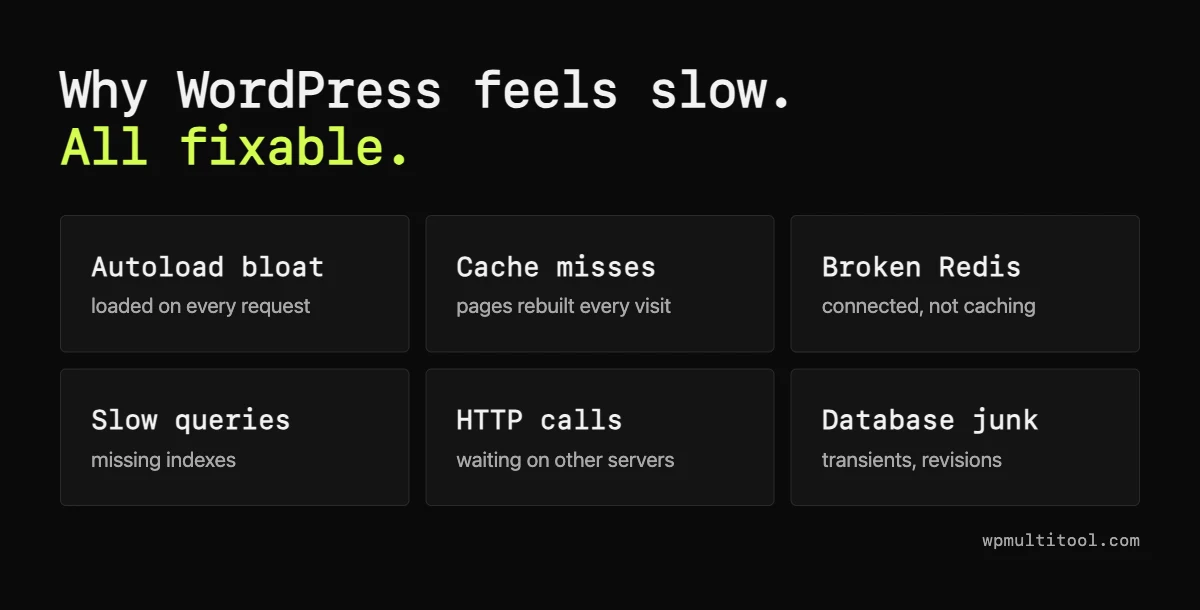
Lighthouse won't name any of these, and all of them are fixable without a new framework. I've written about the big ones: autoload bloat, caches that don't fix a slow site, Redis that says "Connected" and outbound calls on every admin load.
Measure before you migrate WordPress to Astro
Start with the number. PageSpeed Insights shows server response time for any URL, and so does the Network tab in your browser. If the server is fast and the page is still slow, look at the theme first.
If the server is slow, you need to know why. Query Monitor breaks down a single request, and it's free. For one ranked list for the whole site, Site Doctor in WP Multitool checks the page cache, Redis, autoload, database bloat, OPcache and plugins that make their own HTTP calls, and links each finding to its fix. Slow queries join the list once the Slow Query Analyzer has caught some.
The stay-on-WordPress stack
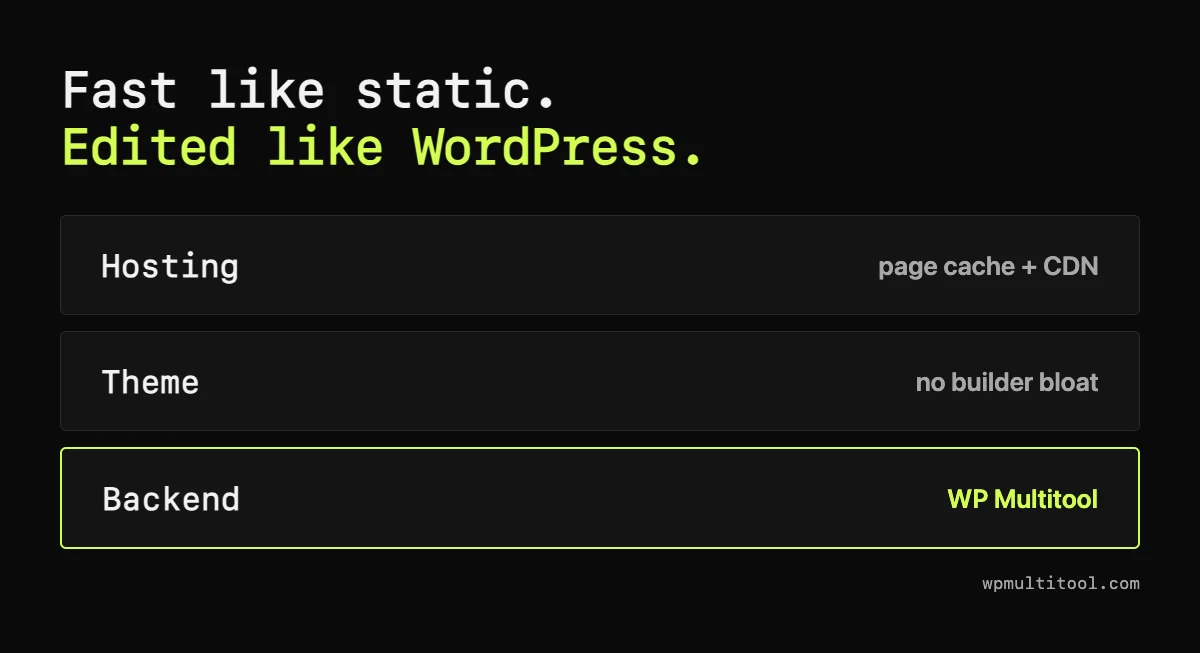
This is how I run my own sites. They're self-hosted on a VPS where I control the whole stack: PHP, the page cache, Redis and the CDN in front of it. Nothing is hidden behind a host's dashboard, so when something is slow I can see why.
For shops, I built UltrafastWoo, a classic WooCommerce theme. Both of its demo stores score 100 for mobile performance on PageSpeed Insights, with a 500-product catalogue. For the backend there's WP Multitool, $79 a year for one site with every module and a 14-day refund.
Not sure which layer is your problem? Book a 30-minute WordPress consultation and I'll go through your site with you before you decide anything.
Astro or WordPress: the cheatsheet
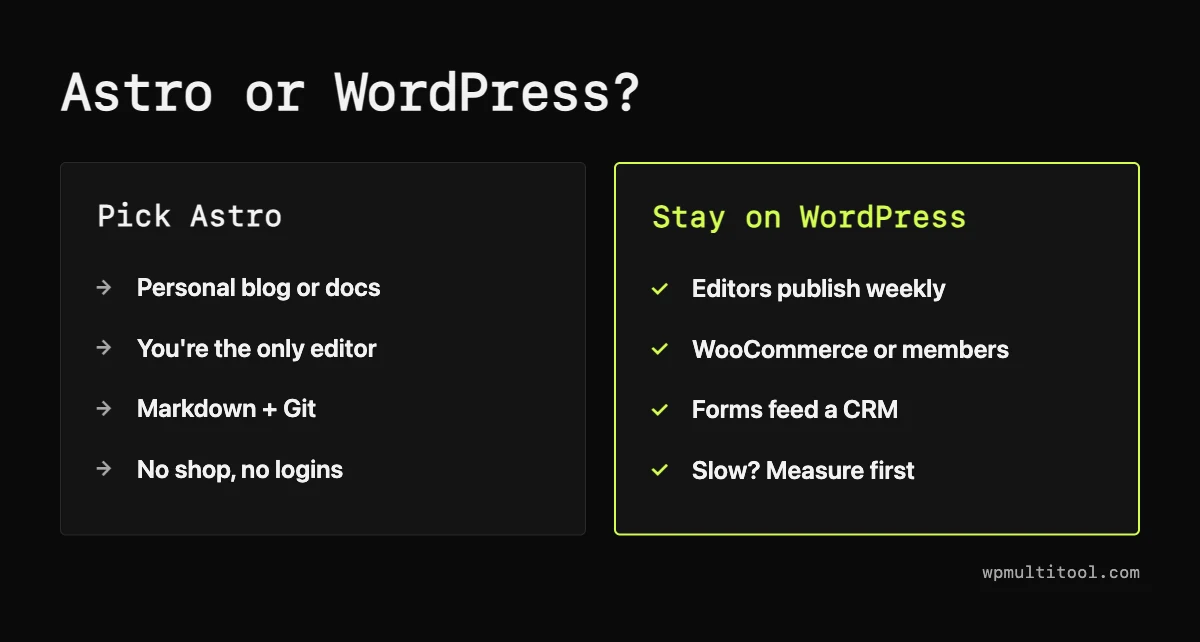
Most developer blogs fit the left column, and for them Astro is the better tool. Most business sites fit the right one, and that's where WordPress is still hard to beat: a mature editor, a plugin for nearly everything, and hosting and help almost anywhere.
The regret stories I found come from this group. Bob Matyas moved his site back from Astro to WordPress. He works in WordPress for a living, so weigh that. A developer writing about client sites on Astro described "a stream of tiny unpaid jobs", because "The client is never going to open a JSON file." On r/astrojs, a developer with ten years of client work wrote: "I’ve never had a client over the last 10 years who haven’t wanted to edit their own site in some way shape or form."
Even Cescato, who left, wrote that "WordPress still has one decisive advantage: it lets you focus on writing first."
The middle path: headless WordPress with Astro
There's a third option the WordPress vs Astro posts mostly skip. Keep WordPress as the editor and let Astro build the public site from its content. Astro's own docs cover it.
Editors keep the screen they know and visitors get static pages. The cost is two systems to run, plus a rebuild or preview setup so editors can see their changes before they go live. The WordPress side still needs to be quick for the people using it - see why is my WordPress admin so slow.
Is WordPress dead?
No. It still runs about four in ten websites. W3Techs had it at 43.6% at the start of 2025 and 42.2% in May 2026, per Search Engine Journal, and WP Forged put it at 40.2% in September. So it's shrinking, but from a size no other CMS comes close to. As WP Forged itself put it, "The figures say WordPress is shrinking, not where the sites go."
From what I read, developers with personal blogs make up most of the public migration stories. Agencies are moving some small-business sites too. I didn't find many write-ups from shops or editorial teams leaving, though that may just mean they don't blog about it.
Before you book the migration
If speed is why you're looking at Astro, get the server number first. Fix what you find. Then decide.
My bet is that for most business sites, a good host, a lean theme and a clean backend get you most of the speed of a static site, and you keep everything WordPress is good at. If they don't, you'll leave knowing exactly why, which is more than any of the migration write-ups I found could say.